WHMCS MCP Server Tools Reference
Reference for the 68 core AI tools across 12 categories. Up to 84 tools total when MX Metrics and MX Proposals are licensed. Each tool can be invoked through natural language from Claude, Cursor, or any MCP-compatible client. Describe what you need and the right WHMCS tool runs automatically.
Looking for workflow templates instead? See the MCP Prompts reference for the 10 slash commands that chain these tools end-to-end.
Last updated: April 2026
WHMCS Client Management
Search, create, update, and delete client records in your WHMCS database.
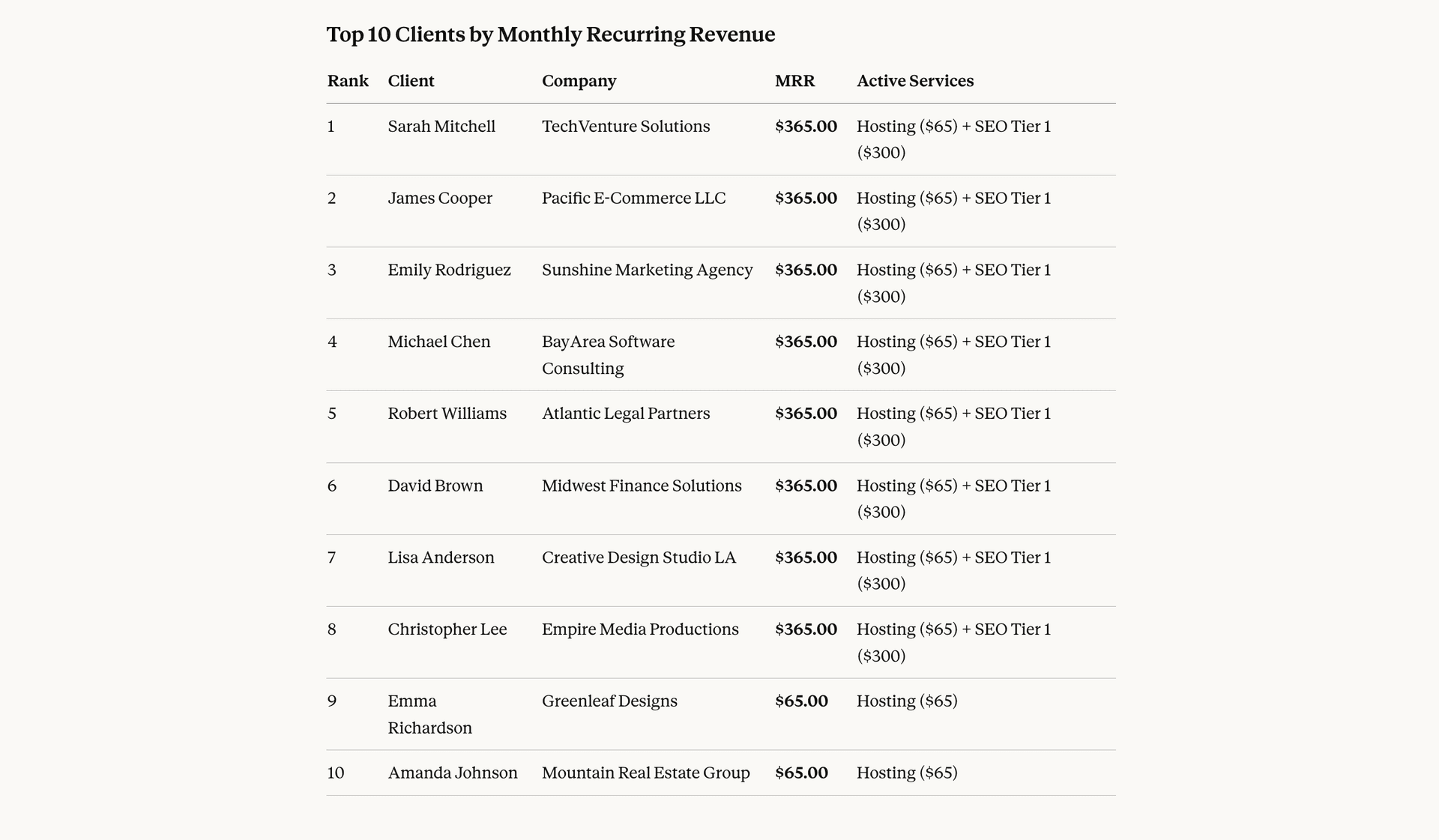
whmcs_list_clientsList and filter clients by status, group, or search term. Returns paginated results with basic client information.
Example prompt
“Show me all active clients sorted by company name”
Example output
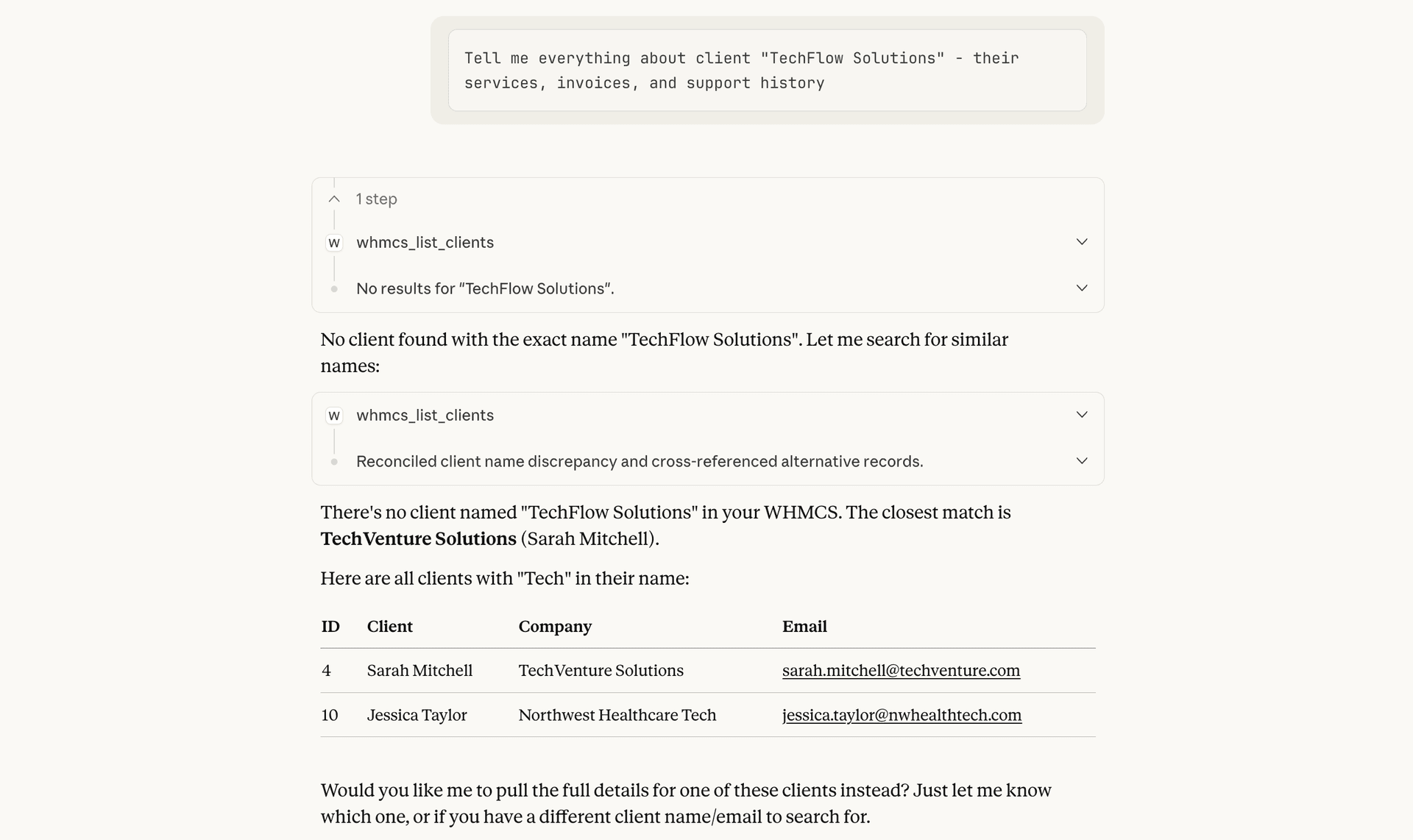
whmcs_get_clientGet detailed information for a specific client including their services, invoices, support tickets, and custom field values.
Example prompt
“Tell me everything about client ID 42”
Example output
whmcs_create_clientCreate a new client with contact details, address, and custom fields. Optionally send a welcome email.
Example prompt
“Create a new client for Acme Corp with email john@acme.com”
whmcs_update_clientUpdate client information like email, phone, address, notes, or custom fields. Partial updates are supported.
Example prompt
“Update client 42 phone number to +1-555-0123”
whmcs_delete_clientPermanently delete a client and all associated data. This action cannot be undone.
Example prompt
“Delete client 99 and all their records”
WHMCS Products
List available hosting products and create new ones in the catalog.
whmcs_list_productsList all available WHMCS products with pricing and configuration details.
Example prompt
“Show me all available hosting products”
whmcs_create_productCreate a new product in the WHMCS catalog. Requires a name and a product group ID. Note: WHMCS exposes no UpdateProduct or DeleteProduct API, so edits and removals must be done in the WHMCS admin UI after creation.
Example prompt
“Create a Business Hosting product in group 2 at $15/month with cpanel provisioning”
WHMCS Service Management
Manage the full WHMCS service lifecycle: provisioning, suspension, upgrades, and termination.
whmcs_list_client_servicesList services for a specific client with filtering by product, status, or server. Includes domain and pricing details.
Example prompt
“List all services for client 42”
whmcs_update_serviceUpdate a service including status, billing cycle, next due date, or package assignment.
Example prompt
“Change service 156 billing cycle to annually”
whmcs_provision_serviceProvision and activate a service on the assigned server. Triggers the module create function.
Example prompt
“Provision the pending service for client 42”
whmcs_suspend_serviceSuspend a service for non-payment or abuse. Optionally specify a reason that is logged.
Example prompt
“Suspend service 156 for non-payment”
whmcs_unsuspend_serviceUnsuspend a previously suspended service and restore access.
Example prompt
“Unsuspend service 156, they paid their invoice”
whmcs_terminate_servicePermanently terminate a service and remove from server. This action cannot be undone.
Example prompt
“Terminate service 156 per client request”
whmcs_change_packageUpgrade or downgrade a service to a different product package.
Example prompt
“Upgrade service 156 to the Business Hosting plan”
whmcs_change_passwordChange the password for a service account on the provisioning server.
Example prompt
“Reset the password for service 156”
WHMCS Invoice Management
Create invoices, record payments, apply credits, and manage client billing in WHMCS.
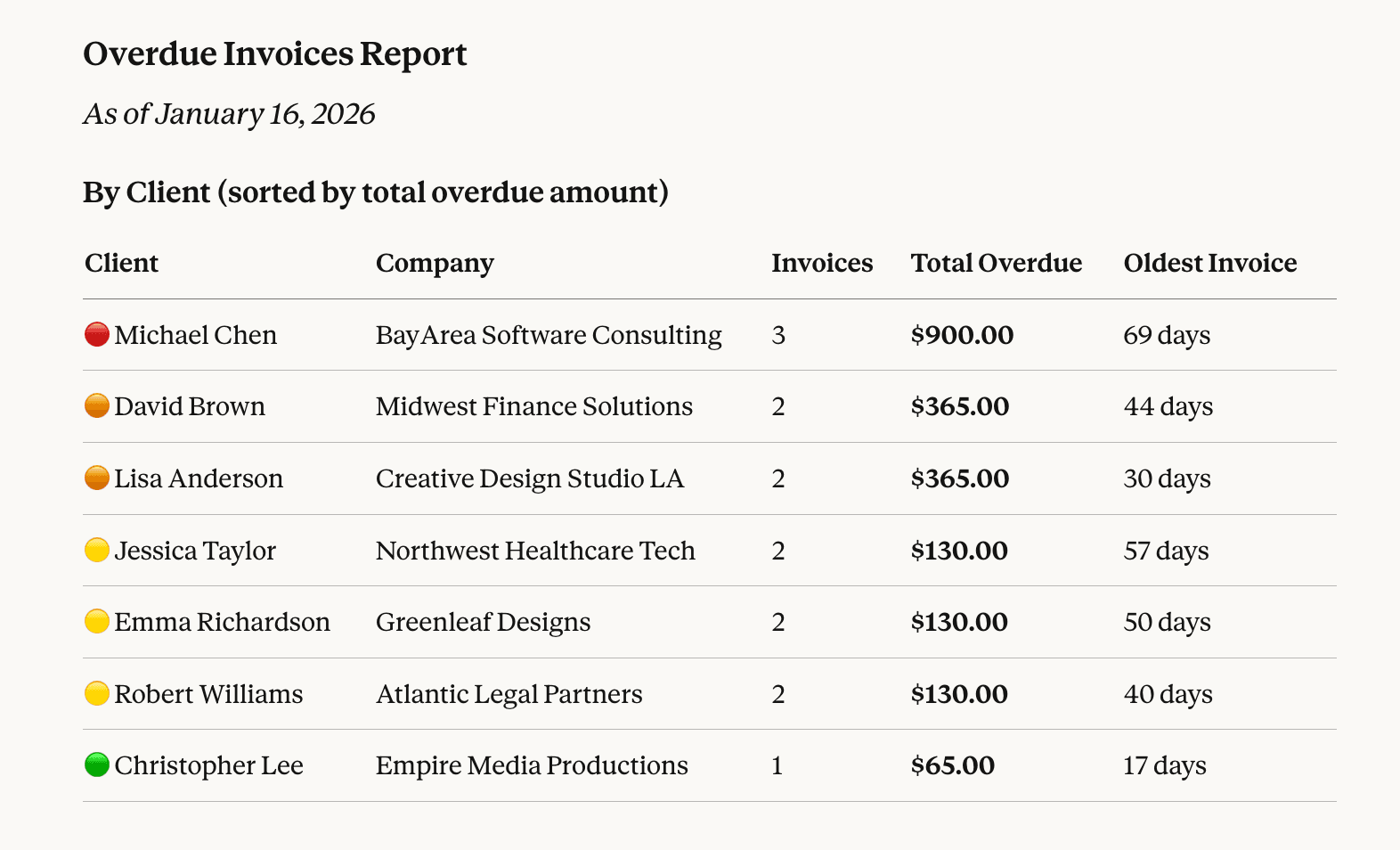
whmcs_list_invoicesList invoices with filtering by status, date range, or client. Shows totals and payment status.
Example prompt
“Show me all overdue invoices”
Example output
whmcs_get_invoiceGet detailed invoice including line items, payments, transactions, and notes.
Example prompt
“Show me invoice #5678”
whmcs_create_invoiceCreate a new invoice for a client with custom line items, due date, and payment terms.
Example prompt
“Create an invoice for client 42 with a $50 setup fee”
whmcs_add_invoice_paymentRecord a payment against an invoice with optional transaction ID and gateway reference.
Example prompt
“Add a $100 payment to invoice #5678”
whmcs_add_invoice_line_itemsAdd one or more line items to an existing invoice. Each item includes description, amount, and optional tax.
Example prompt
“Add a $25 consulting fee line item to invoice #5678”
whmcs_update_invoiceUpdate invoice status, due date, payment method, or notes. Partial updates are supported.
Example prompt
“Mark invoice #5678 as paid and add a payment note”
whmcs_apply_creditApply client credit balance to reduce an invoice total. Adjusts both the invoice and the client credit.
Example prompt
“Apply $50 credit to invoice #5678”
whmcs_get_transactionsList payment transactions with filtering by invoice, client, or date range.
Example prompt
“Show me all transactions for client 42 this month”
WHMCS Quote Management
Create, send, and manage WHMCS quotes for custom pricing.
whmcs_list_quotesList all quotes with filtering by status, validity, or client.
Example prompt
“Show me all pending quotes”
whmcs_get_quoteGet detailed quote information including line items, validity period, and acceptance status.
Example prompt
“Show me quote #789”
whmcs_create_quoteCreate a new quote for a client with custom line items and validity period.
Example prompt
“Create a quote for client 42 for custom development work”
whmcs_update_quoteUpdate quote details, line items, or status. Partial updates are supported.
Example prompt
“Update quote #789 to extend validity by 30 days”
whmcs_send_quoteSend quote to client via email for review and acceptance.
Example prompt
“Send quote #789 to the client”
whmcs_accept_quoteAccept a quote and convert it to an invoice for billing.
Example prompt
“Accept quote #789 and generate an invoice”
WHMCS Order Management
Process WHMCS orders from creation through acceptance, cancellation, or deletion.
whmcs_list_ordersList all orders with filtering by status, date range, or client. Returns order totals and payment status.
Example prompt
“Show me all pending orders from this week”
whmcs_get_orderGet detailed order information including line items, payment status, and associated invoices.
Example prompt
“Show me order #1234”
whmcs_create_orderCreate a new order for a client with specified products, addons, and billing cycle.
Example prompt
“Create an order for client 42 with the Pro Hosting plan”
whmcs_accept_orderAccept a pending order after fraud check. Optionally triggers service provisioning.
Example prompt
“Accept order #1234”
whmcs_cancel_orderCancel an order and optionally refund the payment. Removes pending services.
Example prompt
“Cancel order #1234 and refund the payment”
whmcs_delete_orderDelete a cancelled or fraud order. Cannot delete active orders with provisioned services.
Example prompt
“Delete the cancelled order #1234”
WHMCS Support Tickets
Manage WHMCS support tickets, replies, notes, and customer communication.
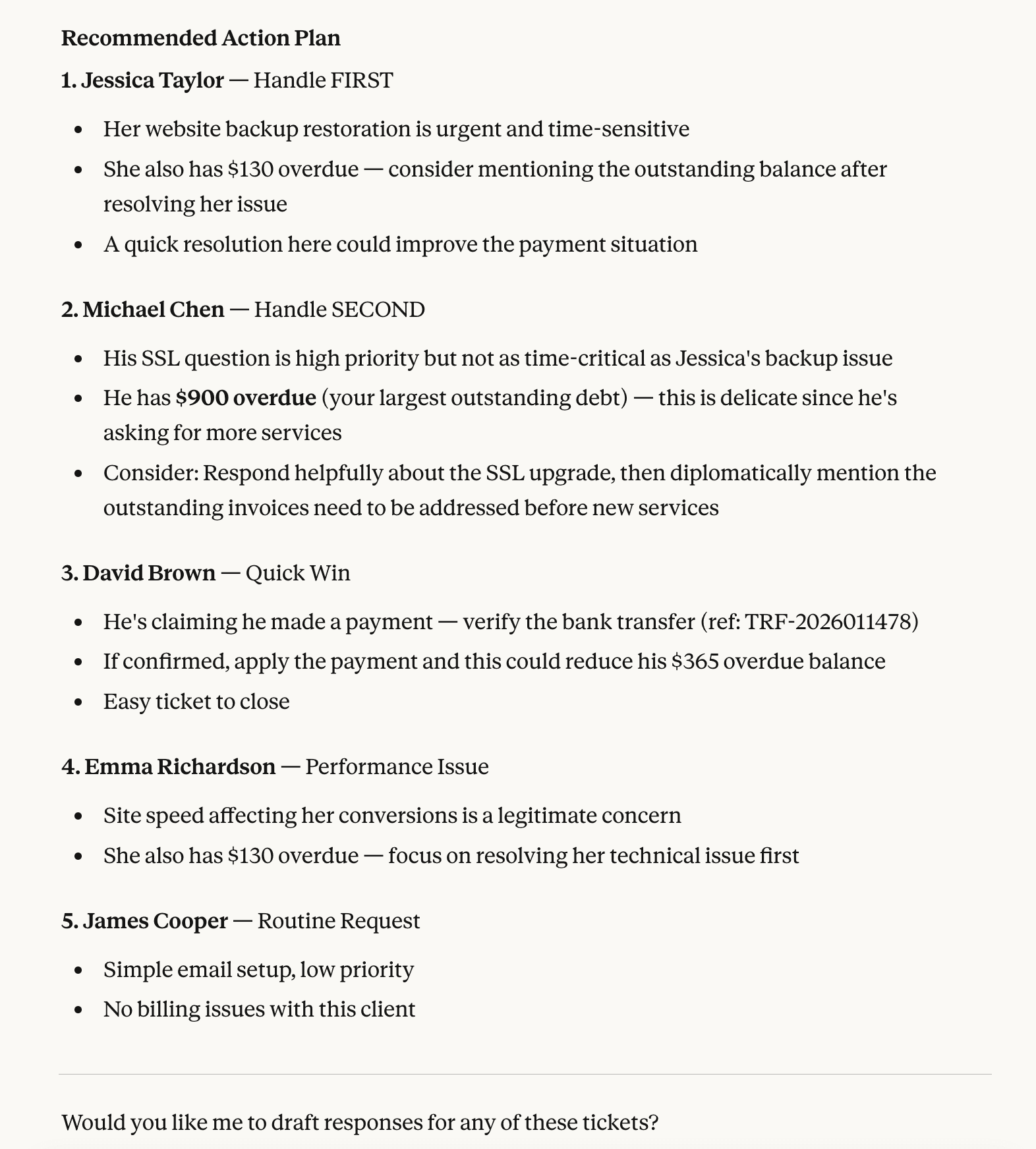
whmcs_list_ticketsList support tickets with filtering by status, department, priority, or client.
Example prompt
“Show me all open high-priority tickets”
Example output
whmcs_get_ticketGet ticket details including all replies, attachments, and internal notes.
Example prompt
“Show me ticket #ABC-123”
whmcs_create_ticketCreate a new support ticket for a client or as an admin with department and priority.
Example prompt
“Create a ticket for client 42 about their DNS issue”
whmcs_reply_ticketAdd a reply to an existing ticket as admin or client. Optionally change status.
Example prompt
“Reply to ticket #ABC-123 with the solution”
whmcs_update_ticketUpdate ticket subject, status, priority, department, or flag. Partial updates are supported.
Example prompt
“Change ticket #ABC-123 priority to high and assign to billing department”
whmcs_delete_ticketPermanently delete a ticket and all its replies and notes. This action cannot be undone.
Example prompt
“Delete spam ticket #ABC-999”
whmcs_add_ticket_noteAdd an internal admin note to a ticket. Notes are not visible to the client.
Example prompt
“Add a note to ticket #ABC-123 that the issue was escalated to the server team”
whmcs_list_departmentsList support ticket departments with IDs, names, awaiting-reply counts, and open-ticket counts. Call before creating or filtering tickets so the AI passes real department IDs instead of guessing.
Example prompt
“Which departments handle tickets and how many are open in each?”
whmcs_list_ticket_statusesList configured ticket statuses, including any custom statuses the admin has added. Use these exact titles when filtering tickets or setting status.
Example prompt
“What ticket statuses are configured in this WHMCS?”
WHMCS Domain Management
Inspect, configure, and register domains tied to client accounts. Three tools incur real registrar costs and ship disabled by default.
Heads up: destructive tools in this category
register, transfer, and renew commit real money with the configured registrar. They are seeded disabled by default in v1.6.0 and must be opted in from the Tool Management tab before any AI can call them.
whmcs_list_client_domainsList domains owned by clients with optional filters (client ID, domain ID, domain name, pagination). Returns registrar, status, and expiry information.
Example prompt
“Show all domains for client 42 expiring this quarter”
whmcs_register_domainDestructiveRegister a domain through the configured registrar. Destructive and irreversible: commits real money. Seeded disabled and shipped with a warning that AI clients must surface before invoking.
Example prompt
“Register example-newshop.com for client 42 (after I confirm)”
whmcs_transfer_domainDestructiveTransfer a domain into your registrar. Destructive: commits real money and triggers a registrar-side transfer process. Optional EPP code parameter.
Example prompt
“Transfer legacydomain.com to our registrar with EPP code ABC123”
whmcs_renew_domainDestructiveRenew a domain at the registrar. Destructive: commits real money. Optional renewal period in years.
Example prompt
“Renew client-site.com for 2 more years”
whmcs_get_domain_whoisPerform a WHOIS lookup against any domain name to check availability and current registrar information. Safe and read-only.
Example prompt
“Is brand-new-startup.io available?”
whmcs_get_domain_nameserversRetrieve the nameservers (ns1 through ns5) currently configured against a domain.
Example prompt
“What nameservers are set for domain 312?”
whmcs_update_domain_nameserversUpdate a domains nameservers. Requires ns1 and ns2 plus the domain ID or name. ns3 through ns5 are optional.
Example prompt
“Update nameservers on client-site.com to ns1.cloudflare.com and ns2.cloudflare.com”
whmcs_get_domain_lock_statusCheck whether a domain is locked at the registrar (transfer-out protection).
Example prompt
“Is domain 312 locked at the registrar?”
whmcs_update_domain_lockEnable or disable the registrar lock on a domain. Toggle transfer-out protection on or off.
Example prompt
“Lock domain 312 to prevent unauthorized transfers”
whmcs_get_tld_pricingRetrieve the full TLD pricing matrix. Optionally scope to a currency ID or a client ID (uses the clients own currency).
Example prompt
“What is the renewal price for .io domains in USD?”
WHMCS Affiliates and Promotions
Surface affiliate accounts, activate new affiliates, and inspect promotion codes. Grouped together because both are growth and marketing primitives.
whmcs_list_affiliatesList affiliate accounts with referral counts, pending and paid commission totals, and visitor stats. Optional filter by client ID.
Example prompt
“Show all active affiliates and their commission totals”
whmcs_activate_affiliateActivate an existing client as an affiliate so they can earn commissions on referred sales. Note: the WHMCS affiliate API uses userid to mean client ID.
Example prompt
“Activate client 42 as an affiliate”
whmcs_list_promotionsList promotion and discount codes with type, value, applicable products, expiry, and usage stats. Pass a code to fetch a single promotion.
Example prompt
“Show all active promotion codes and how many times each has been used”
System and Configuration
Monitor WHMCS system status, manage admin users, servers, email templates, and activity logs.
whmcs_check_capabilitiesCheck which MX addons are installed and licensed on the WHMCS instance. Call this first to discover what tools are available.
Example prompt
“What addons are installed on this WHMCS?”
whmcs_get_statusGet WHMCS system status including version, active clients, products, orders, and uptime statistics.
Example prompt
“Show me the system status overview”
whmcs_admin_usersList all WHMCS admin users with their roles and last login timestamps.
Example prompt
“Who are the admin users?”
whmcs_payment_methodsList all configured payment gateways and their active status.
Example prompt
“What payment methods are configured?”
whmcs_currenciesList all currencies configured in WHMCS with exchange rates and formatting.
Example prompt
“What currencies are set up?”
whmcs_activity_logView recent WHMCS activity log entries. Useful for auditing admin actions and system events.
Example prompt
“Show me the last 20 activity log entries”
whmcs_log_activityWrite a custom entry to the WHMCS activity log for tracking admin actions.
Example prompt
“Log that I reviewed client 42 account for compliance”
whmcs_email_templatesList email templates by type (general, product, domain, invoice, support, etc.).
Example prompt
“Show me all invoice-related email templates”
whmcs_send_emailSend an email to a client using a predefined WHMCS email template.
Example prompt
“Send the welcome email template to client 42”
whmcs_todo_itemsList admin to-do items with filtering by status and assignment.
Example prompt
“Show me all pending admin to-do items”
whmcs_list_serversList all configured servers with their type, hostname, and active service count.
Example prompt
“Show me all configured servers”
WHMCS Business Metrics
Access WHMCS financial summaries, revenue breakdowns, and client analytics.
Requires MX Metrics addon
whmcs_get_summaryGet financial summary including MRR, ARR, costs, and net profit for your WHMCS instance.
Example prompt
“Show me the revenue summary”
whmcs_get_revenue_by_productGet revenue breakdown by product or service showing MRR, ARR, client count, and percentage.
Example prompt
“Break down revenue by product”
whmcs_get_top_clientsGet top clients ranked by recurring revenue or lifetime value.
Example prompt
“Who are our top 5 clients by MRR?”
whmcs_get_high_support_clientsGet clients with the most support tickets. Useful for identifying high-maintenance accounts.
Example prompt
“Show clients with the most support tickets”
whmcs_get_cost_breakdownGet detailed cost breakdown by expense group including fixed expenses and service costs.
Example prompt
“What is our cost breakdown by category?”
WHMCS Proposals
Create and manage client proposals with line items, signatures, email delivery, and lifecycle management.
Requires MX Proposals addon
whmcs_list_proposalsList proposals with optional filtering by status, search term, date range, and amount range.
Example prompt
“List all sent proposals from this month”
whmcs_get_proposalGet detailed proposal information including line items and client data.
Example prompt
“Show me proposal #5 with all its line items”
whmcs_create_proposalCreate a new proposal as a draft. Include line items with description, quantity, unit price, and billing cycle.
Example prompt
“Create a proposal titled Website Redesign for client 12 with two items”
whmcs_update_proposalUpdate an existing proposal. Only provided fields will be changed. Include full items array to replace all line items.
Example prompt
“Update proposal #5 title to Premium Website Package”
whmcs_delete_proposalDelete a proposal and all related data including items, client data, and signatures. This action is irreversible.
Example prompt
“Delete proposal #10”
whmcs_send_proposalSend a draft proposal to the client via email. Changes status from draft to sent.
Example prompt
“Send proposal #5 to the client”
whmcs_decline_proposalDecline a proposal with an optional reason. The client will be notified.
Example prompt
“Decline proposal #7 with reason: budget constraints”
whmcs_cancel_proposalCancel an active proposal. Useful when a deal falls through or terms change.
Example prompt
“Cancel proposal #8”
whmcs_proposal_activityGet the activity log and viewing statistics for a proposal, including when the client viewed it.
Example prompt
“Show me the activity log for proposal #5”
whmcs_proposal_templatesList or get email templates used for proposal notifications.
Example prompt
“Show me all proposal email templates”
whmcs_update_proposal_templateUpdate an email template used for proposal notifications.
Example prompt
“Update the proposal sent email template subject line”
Pro Tip
You don't need to memorize tool names. Claude understands context and will automatically select the right tool based on your request. Just describe what you want in plain English.